Best viewed in landscape, or on a computer — the demos display better with more width.
Apple silicon, macOS 14 and later
Know your
notchbors.
Never lose track of your Spaces again. Hopnotch lines them up either side of your notch, named and one click away, and keeps them there even over fullscreen apps, where the menu bar gives up.
No account, no card. The trial is the whole app, and $14.99 once if you keep it.- Signed with an Apple Developer ID
- Notarized by Apple
- Opens with no security warning
Try it here
Six Spaces. Click one and hop.
This is the strip itself, laid out the way the app draws it: the Spaces either side of you, the notch between them, and two pills a side, which is where the app starts out.
Over fullscreen apps
Your menu bar disappears in fullscreen.
Hopnotch doesn't.
A fullscreen app takes the whole display, menu bar included, which is exactly when you most need to know where everything else went. The strip stays put above it, so every other Space is still in view, and still one key or one click away.
- Any fullscreen appBrowsers, editors, video calls, Spotify. Each one is a Space, so each gets a pill.
- Your way inClick a pill, tap a key, or swipe two fingers over the strip.
- Stands down for gamesWith a game in front, the strip hides and every hotkey goes back to the game.
Your Spaces, finally visible.
macOS lets you have as many Spaces as you like and then hides every one of them. So you swipe, guess, overshoot, and swipe back. Or you open Mission Control, which covers the very screen you were trying to read.
Get around
Glance instead of guessing
The pills on each side name the Spaces next to you and show the apps living on them. The notch is you: left of it is left of you, in the same order as swiping. Click any pill to land there, however far away it is.
See ahead
Peek before you go
Rest the pointer on a pill and a snapshot of that Space drops down beneath it, so you know what is there before you commit to going.
Snapshots are taken while you are on each Space, kept in memory only, and wiped when your screen locks. Off until you switch them on.
See ahead
Every Space at once
Hold the map key and all of your Spaces fan out beneath the strip, the one you are on ringed. It is only a look: let go and nothing has moved.
Hold the next key instead and the ring walks along the map. Let go on the Space you want and you are there.
Find it
Name it, then Spotlight it
Right-click a pill and give its Space a name, one emoji welcome. The name goes on the pill, and it goes into Spotlight: type “coding” and you land on that Space, even with the strip hidden.
Out of your way
Your menu bar is still yours
Reach into an empty stretch of the strip and it steps aside for the real menu bar underneath. Clicks pass straight through wherever there is no pill, and click the notch to put the strip away altogether.
No Dock icon, no window, nothing stealing focus. Your trackpad swipes, Mission Control and ⌃← ⌃→ all work exactly as they did.
Keys that suit you
Previous and next on any keys you record, ⌃⌥← and ⌃⌥→ to start. Tap twice and you hop twice. ⌃⌥1 to ⌃⌥9 jump that many Spaces in one go. Or skip keys entirely: one swipe over the strip is one Space.
Loops around
Step past your last Space and you are back at the first, with a flourish you pick: Carousel, Shockwave, Rollover, Comet, Portal, Projector or Zoom Out.
Find the mic that is still on
Pills show when a Space is using your microphone or camera, or playing sound. The meeting you forgot to leave, or the tab making noise, stops being a hunt through every Space you have open.
Colour-code them
Give any Space its own colour, from the palette or the full colour picker, and save the ones you like as presets. Make work red and music green and you stop reading the pills at all.
Room for every Space
Show one to four pills a side, or up to fifteen with Compact Pills. Anything beyond that waits behind the ⋯; hover it for the rest.
Pauses for games
While a game is in front, Hopnotch hides itself and lets go of every hotkey so the game gets them. Films and browsers are deliberately left alone.
Drive it from anywhere
Switch on URL commands and Shortcuts, Raycast, Alfred or a Stream Deck can move you with hopnotch://next, hopnotch://previous or hopnotch://switch?index=3. Off by default, since any web page can open a link.
No notch? Still works
On an M1 MacBook Air, a Mac mini, Studio or iMac, or an external display, the strip splits around the middle of the menu bar instead, and its menu bar icon starts switched on.
Make it yours.
This thing sits in your menu bar all day, so it should look like something you chose rather than something you installed. Almost every part of it can be changed.
Each is a scene in its own right. Departures boards, canyons, lanterns, wind farms, koi ponds, arcades. Click through a few under the demo above and watch the whole strip change character.
Dark, colour, gradient, glass, outline, neon, holo, duotone, stripe and ember. Set the opacity too, so the strip can sit quietly rather than announce itself.
Pills can bubble, drop, flip, spin, cascade, scatter, stamp, swing or swirl into place. Or fade, if you would rather they did not move at all.
Your names, your colours
Rename a Space to whatever you actually call it, give it an accent so you navigate by colour instead of reading, and keep the colours you like as presets.
Little touches
Compact pills when you want icons only, a fuller bar when you want presence, and ten roaming pets if you like your menu bar with a bit of life in it.
Or keep just the scene
Background Only hides every pill and leaves the themed bar on its own. Hover where the pills would be and you get your real menu bar; hotkeys, scrolling and the map keep working.
Every theme is its own thing.
Fifty-one of them, and none is another one in a different colour. Each has its own artwork and its own way of moving, so the one you settle on genuinely looks like nothing else.









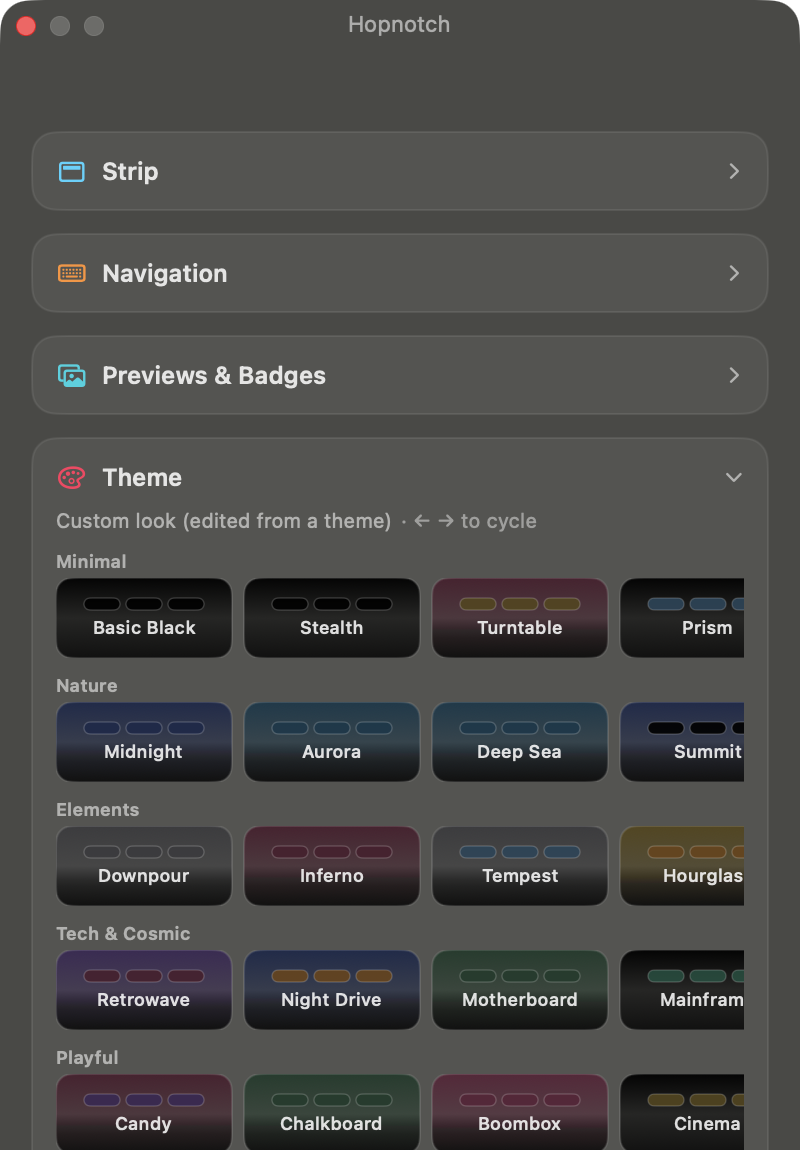
The other 42 are in Settings
They are grouped by mood rather than listed alphabetically, so finding the one you want is a glance instead of a scroll through fifty names. Pick one and the whole strip changes at once.
Then take it apart. A theme is a starting point rather than a fixed preset: the background style, the pill style, both colours, both opacities and the way pills animate in are all yours to change — which is why the panel here reads edited from a theme. Save what you end up with under your own name and it joins the gallery beside the built-in ones.
The three day trial is the whole app, so you can try every one of them, on your own Spaces, before you decide anything.
Two minutes, start to finish.
Everything above, on one real Mac, zoomed in so the menu bar is readable. No voiceover, so it is safe to play at your desk.
It will not eat your battery & CPU.
Menu bar apps have earned their reputation here, so this one is built the other way round. Scenes stop drawing altogether once you stop looking at them, and wake again the moment you need them.
- Scenes park themselves after about 90 seconds untouched, and nothing draws while the strip is off screen.
- Low Power Mode freezes every scene automatically.
- Battery Saver halves every frame rate, and Settings marks the options that cost more with a ⚡.
Hi friend!
I'm a solo developer in Singapore, and theMACadamia is just the name I put on my work. There are no support queues and no ticket numbers: if you email support@themacadamia.com it comes to me, and I answer it! I am also on LinkedIn if you would rather see who you are buying from first!
I built Hopnotch because I kept losing my own windows. Ten Spaces open, no idea which one had the app I needed, and Mission Control was inconvenient and a temporary fix. I decided to do something about it, which has now turned into this.
It also means the three day trial is not a formality. Use the whole app, on your own Spaces, before you decide anything. If it does not earn its place in your menu bar, do not buy it :)
Simple pricing.
Three days free, no card. Then whichever of these annoys you less.
Trial Start here
The whole app, every theme, on up to three Macs. No account and no card — it simply stops after three days.
Notarized by Apple
A 3.5 MB disk image. Drag it to Applications and open it once.
Lifetime Best value
Every future update, on up to three Macs — yours, or your family's or a friend's. Nothing to cancel.
Notarized by Apple
Lemon Squeezy handles the payment, tax included. Your key arrives by email right after.
Monthly Month to month
If you would rather not commit yet. The same app on the same three Macs, shared the same way, cancel any time.
Notarized by Apple
Lemon Squeezy handles the payment, tax included. Your key arrives by email right after.
Fourteen days to change your mind — email me and I refund it, no argument.
There is only one Hopnotch. The download is the full app whichever way you pay, so buying first is fine: your key arrives by email, and pasting it into Settings unlocks the copy you install from here.
What happens when you click download.
No account, no installer that asks you questions, and nothing left behind if you decide it is not for you.
- 1
Drag it across
The disk image opens with Hopnotch beside your Applications folder. Drag it over and eject the image.
- 2
Open it once
It goes straight to the menu bar beside your notch. No Dock icon, no window to arrange, nothing taking focus.
- 3
That is the whole setup
Three days start immediately. Previews are the one thing that asks a permission, and only if you switch them on.
Questions worth asking.
Which Macs does it work on?
Any Apple silicon Mac running macOS 14 or later. It is built around the notch, so it is happiest on a Mac that has one:
- MacBook Pro 14″ and 16″, 2021 and later
- MacBook Air 13″ with M2, 2022 and later
- MacBook Air 15″ with M2, 2023 and later
It works without one too: an M1 MacBook Air, a Mac mini, Studio or iMac, or an external display. There, Hopnotch leaves a gap in the middle of the menu bar where a notch would be and splits the strip around it, and its menu bar icon starts switched on, so Settings is always a click away. Intel Macs are not supported.
Which versions of macOS?
| macOS | Status |
|---|---|
| 27 Golden Gate | Supported, and what it is built and tested on |
| 26 Tahoe | Supported |
| 15 Sequoia | Supported |
| 14 Sonoma | Supported, the minimum |
| 13 and earlier | Will not launch |
What happens when macOS updates?
macOS has no public way to read or switch Spaces, so Hopnotch uses private system interfaces, which is also why it is not on the App Store. A macOS update can change them, and apps in this category have been broken by updates before.
So Hopnotch is built to notice. If an update ever takes away what it needs, it says so instead of showing an empty strip, and offers the fix straight away; point releases go out quickly and install from inside the app with one click. New versions of macOS are tested in beta, before they reach you. The terms put the risk plainly, and the three day trial is there so you can check on your own Mac first.
Does it work over fullscreen apps?
Yes, and that is where it earns its keep: a fullscreen app hides the menu bar, and the strip stays. Each fullscreen app is a Space of its own, so each one gets its own pill.
One thing to know: macOS slides a fullscreen app's title bar down whenever the pointer reaches the top of the screen, and reaching for the strip counts. That is macOS, and it cannot be switched off, so in fullscreen the hotkeys and scrolling are the smoother way to hop.
Is it signed and checked by Apple?
Yes. Hopnotch is signed with an Apple Developer ID and notarized, which means Apple has scanned the exact build you download for malicious software and issued it a ticket. It is a security check rather than a review — nobody at Apple approves what the app does — but it is the check that makes it open normally, with no warning and no right-click-to-open workaround.
Updates are held to the same standard. Every one is checked against a signing key built into the app before it installs, so even if this website were compromised, nothing unsigned could reach you.
What permissions does it need?
Hopnotch never asks for Accessibility. Shortcuts run through Carbon and ordinary event monitors, and an app that watches your Spaces has no business asking to control your computer.
Screen Recording is the one permission it may ask for, and only if you switch previews on. Leave them off and macOS never prompts.
What does it send over the network?
Two things, and you can inspect both: a daily check for updates, and a license check when you activate and at most once a week after that. No analytics, no telemetry, no account.
During the trial the license check never happens, because there is no license to check yet. The update check is the only request the app makes before you buy anything. The privacy page lists every byte.
How many Macs does one license cover?
Three, and they do not all have to be yours. Put it on your own machines, or give a slot to family or a friend — the license covers three Macs however you choose to spread them.
You use the same key on each one, and any Mac can be deactivated from its own settings to free the slot up for someone else.
I bought it first. Is there a separate download?
No, there is only one Hopnotch. Download it from this page, drag it to Applications and open it; the trial and the paid app are the same file. Then paste the key from your receipt email into Settings, or press Activate on the page Lemon Squeezy sends you back to, and it is unlocked for good.
How do I get to Settings?
Right-click the notch, or the middle of the menu bar on a Mac without one; Control-click works too. Or click the Hopnotch icon in the menu bar, if you have it switched on. And one way that always works, even with the strip hidden: open Hopnotch again from Applications, Spotlight or Launchpad, and Settings appears.
Can I get a refund?
Within 14 days, no argument. Email support@themacadamia.com and it comes straight to me. The three day trial is the full app though, so hopefully you will know before you pay.
How do I cancel the monthly plan?
In about thirty seconds, without emailing anyone and without talking to me:
- Open app.lemonsqueezy.com/my-orders, or use the "manage your subscription" link in your receipt email.
- Enter the email address you bought with. Lemon Squeezy emails you a sign-in link, so there is no password to remember.
- Open the Hopnotch order and choose Cancel subscription.
Hopnotch keeps working until the month you have already paid for runs out, then goes quiet. You can also reach the same page from Hopnotch's own settings, under the License tab. If you would rather just email me, that works too.
Stop guessing where your windows went.
Three days, free, nothing to sign up for.